Introduction
I still remember the first time I had to roll back a Node.js/Express API at 1:30 AM because a broken migration slipped through to production — it took forty minutes, and users felt every second of it. That experience is exactly what pushed me to take release management seriously, and the patterns I’ll describe here are ones I now apply across my own projects and homelab infrastructure running on Proxmox.
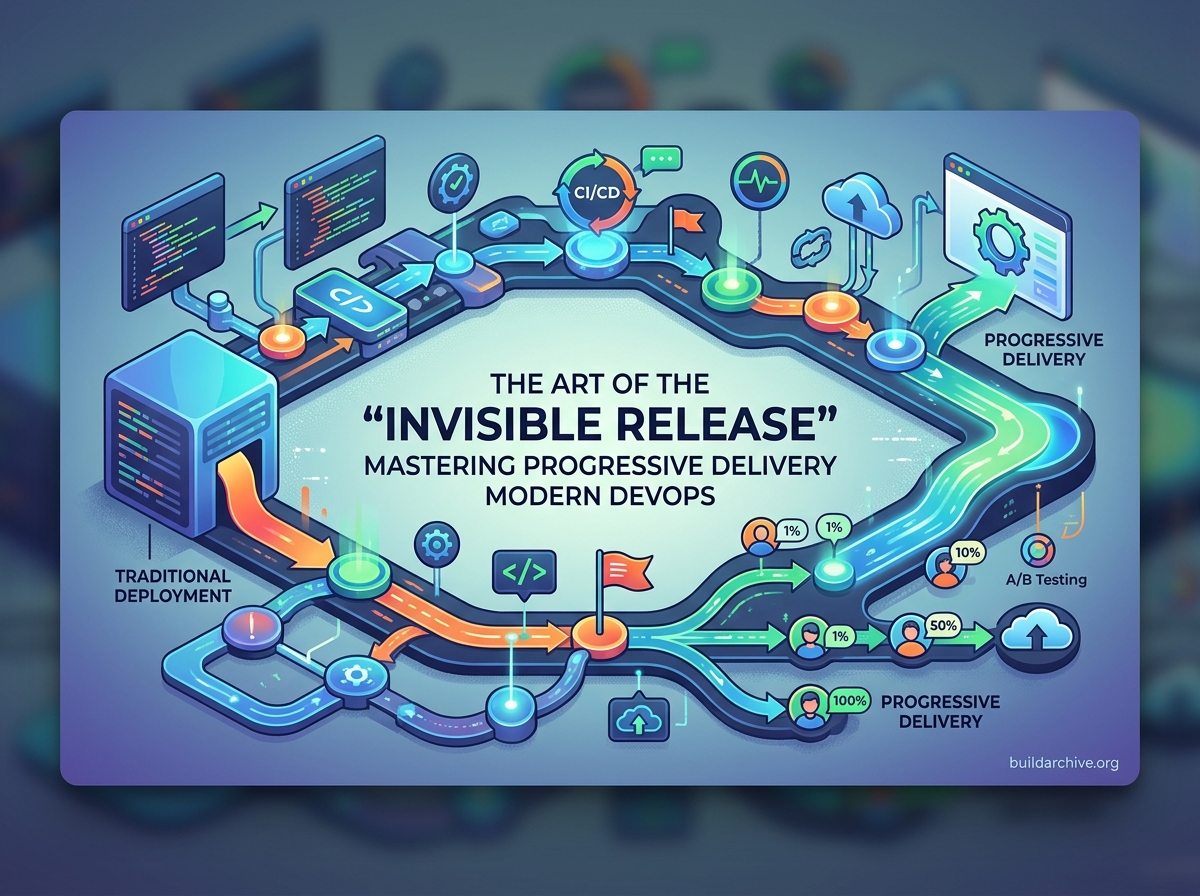
Release management today is the bridge between your CI/CD pipeline and the moment a real user interacts with your code. The goal is not just to deploy faster, but to de-risk the deployment entirely. By decoupling the act of pushing code from the act of activating a feature, modern teams can ship continuously without the white-knuckle anxiety of a traditional “big bang” release. This post covers the practical strategies — Blue/Green deployments, Canary releases, and Feature Flags — that make that possible.
The Strategic Shift: Deployment vs. Release
One of the most important conceptual leaps a team can make is understanding that deployment and release are not the same thing. Deployment is the technical act of installing a version of your software into an environment — for example, copying a Docker image into production. Release is the business decision to make that functionality visible to your customers. When you decouple these two actions, you gain precise control over the user experience and system stability.
Blue/Green Deployments: The Safety Net
A blue/green deployment reduces downtime and risk by running two identical production environments simultaneously. At any given time, only one — say “Blue” — is live and serving all traffic. When a new version is ready, you deploy it to the idle “Green” environment.
- Testing in situ: You can run smoke tests and health checks against the Green environment while it is still completely isolated from real users.
- Instant rollback: If an issue surfaces after the traffic switch, you simply redirect the load balancer back to Blue. No redeploy, no rebuild.
- Zero downtime: The cutover happens at the routing layer, so users never encounter a maintenance page.
In practice with a Node.js stack, you might manage this with an Nginx upstream block that you update via a deployment script, or with a container orchestration tool that handles the routing shift for you automatically once health checks pass.
Canary Releases: Testing in the Wild
Named after the canary in a coal mine, this strategy rolls out a change to a small subset of users before exposing it to everyone. This is particularly effective for catching performance regressions or bugs that only appear under real-world traffic patterns — the kind of bugs that never show up in a staging environment no matter how carefully you mirror production.
By monitoring the canary group against a control group, engineers can observe metrics like error rates, latency, and CPU usage in real time. If the canary group shows signs of trouble, the release is aborted, limiting the blast radius to 1% or 5% of your user base rather than 100%.
De-Risking the Deployment: Strategies for High-Availability
The core objective of modern release management is to minimize the “blast radius” of any potential failure. If a bug slips through your automated test suite, your release strategy should ensure it affects as few users as possible — ideally none. This is achieved through deployment patterns that provide safety nets and near-instant rollback capabilities.
Blue/Green Deployments: The Zero-Downtime Standard
Blue/Green deployment runs two identical production environments in parallel. One environment (Blue) handles all live traffic while the other (Green) sits idle. When a new version is ready, it gets deployed to Green. After passing smoke tests there, the load balancer shifts traffic from Blue to Green in a single, atomic operation. If something breaks, you flip the switch back — rollback takes seconds, not minutes.
With Docker and a reverse proxy like Nginx or Traefik, this pattern is straightforward to implement even outside a managed cloud. Here is a minimal example of how you might automate the traffic switch in a shell script that your CI pipeline calls after a successful health check:
#!/bin/bash
# blue-green-switch.sh
# Assumes two Docker Compose services: app_blue and app_green
# and an Nginx upstream config that we rewrite atomically

NEW_VERSION=$1  # "green" or "blue"
OLD_VERSION=$([[ "$NEW_VERSION" == "green" ]] && echo "blue" || echo "green")

echo "Deploying to $NEW_VERSION environment..."
docker compose pull app_$NEW_VERSION
docker compose up -d --no-deps app_$NEW_VERSION

echo "Running health check on $NEW_VERSION..."
sleep 5
HTTP_STATUS=$(curl -s -o /dev/null -w "%{http_code}" http://localhost:808$([[ "$NEW_VERSION" == "green" ]] && echo "1" || echo "0")/health)

if [ "$HTTP_STATUS" -eq 200 ]; then
  echo "Health check passed. Switching traffic to $NEW_VERSION."
  # Atomically rewrite the Nginx upstream symlink and reload
  ln -sf /etc/nginx/upstreams/$NEW_VERSION.conf /etc/nginx/upstreams/active.conf
  nginx -s reload
  echo "Traffic is now live on $NEW_VERSION. Keeping $OLD_VERSION warm for rollback."
else
  echo "Health check failed (HTTP $HTTP_STATUS). Aborting switch. $OLD_VERSION remains live."
  docker compose stop app_$NEW_VERSION
  exit 1
fi
The key insight here is that Nginx reloads its config without dropping existing connections, so users mid-request on Blue finish cleanly while new requests go to Green. This is why the reload is safe — it is not a restart.
A few practical considerations worth keeping in mind: Blue/Green requires roughly double the compute resources during the transition window. In a cloud environment that cost is marginal because you spin down the old environment once you are confident. In a homelab or self-hosted Proxmox setup, you can achieve the same effect with LXC containers or VM snapshots, just be aware of the RAM overhead. The real value, though — immediate rollback and production-identical staging — almost always justifies it.
Canary Releases: The Incremental Rollout
Named after the canary in a coal mine, this strategy routes a small percentage of real traffic to the new version while the majority stays on the stable one. It is the gold standard for high-traffic platforms where even a subtle regression can have a significant impact before anyone notices.
In practice, you might start by routing 5% of requests to the new version while watching error rates, response latency, and memory usage. If those metrics stay healthy over a defined observation window, you increment to 25%, then 50%, then 100%. If the new version shows signs of trouble at any stage, you drain that traffic back to the stable version — ideally automatically, triggered by your observability tooling rather than a human making a judgment call at 11 PM.
With Nginx, a simple weighted upstream block can implement this without any additional infrastructure:
upstream app_canary {
    server app_stable:3000 weight=95;
    server app_canary:3001 weight=5;
}

server {
    listen 80;
    location / {
        proxy_pass http://app_canary;
    }
}
Adjusting the weights and reloading Nginx is all it takes to shift traffic incrementally. More sophisticated setups use header-based routing — for example, routing requests from internal users to the canary build regardless of the random split — which is where a proper service mesh or a tool like Traefik with middleware rules becomes valuable.
The Power of Feature Flags and Progressive Delivery
The most significant evolution in release management is the shift toward Progressive Delivery, and its foundation is Feature Flags — also called feature toggles. A feature flag wraps new code in a conditional check, keeping the feature inactive even after the code has been merged and deployed. The deployment and the release become two separate, independently scheduled events.
Here is a straightforward TypeScript implementation of a feature flag middleware for an Express API, backed by a simple in-memory store you can swap for a Redis-based or third-party solution like Unleash or LaunchDarkly:
// featureFlags.ts
const flags: Record<string, boolean> = {
  newCheckoutFlow: false,
  experimentalSearch: false,
};

export function isEnabled(flag: string): boolean {
  return flags[flag] ?? false;
}

// In your Express route:
// router.get('/checkout', (req, res) => {
//   if (isEnabled('newCheckoutFlow')) {
//     return newCheckoutHandler(req, res);
//   }
//   return legacyCheckoutHandler(req, res);
// });
The practical benefit is enormous: you can merge a half-finished feature into main, deploy it to production, and know it will never execute for real users until you flip the flag. This eliminates long-lived feature branches, reduces merge conflicts, and lets the CI pipeline stay green continuously. When the business is ready to launch, enabling the feature is a config change — not a deployment event.
The rollout sequence typically looks like this: enable for internal employees first (often called dogfooding), then expand to an opt-in beta group, then to a random 10% of users, and finally to everyone. At each stage you are gathering real signal from real traffic before committing to the full release. This aligns naturally with Agile workflows and makes genuine A/B testing straightforward without requiring a separate code branch or redeployment.
Practical Tips for Expert Release Management
Moving from a basic deployment process to a mature release management workflow involves a handful of practices that are easy to adopt incrementally.
Automate the Go/No-Go decision. Use your observability stack — whether that is Prometheus with Alertmanager, Datadog, or even a custom health-check endpoint polled by your pipeline — to create automated rollback gates. If your Canary sees a statistically significant spike in 5xx errors or a p95 latency regression beyond your defined threshold, the pipeline should trigger a rollback without waiting for a human to notice. The definition of “significant” should be written down and agreed on before the deployment, not decided in the heat of the moment.
Standardize versioning and tagging. Every production artifact should be traceable to a specific Git SHA and a semantic version tag. When something breaks at 2 AM, “what exactly is running right now?” should have an instant, unambiguous answer. In a Node.js project, baking the version into the app itself is trivial:
// In your Express app startup
const pkg = require('./package.json');
console.log(`Starting ${pkg.name} v${pkg.version} (${process.env.GIT_SHA ?? 'unknown'})`);
Pass GIT_SHA as a build argument in Docker and expose it on a /health or /version endpoint so your monitoring tooling can confirm exactly which build is serving traffic.
Plan database migrations as a first-class concern. In my experience, more release failures come from schema changes than from application code bugs. The rule is simple: migrations must be backward-compatible for at least one full release cycle. That means adding columns as nullable before backfilling them, keeping old columns around while new code migrates to the new ones, and only dropping deprecated columns in a subsequent release once you are certain no running instance still references them. With MongoDB and Mongoose, this often means writing migration scripts that tolerate both the old and new document shapes simultaneously.
Communicate proactively with stakeholders. Release management is not purely a technical exercise. Automated Slack or Teams notifications when a feature flag is enabled, when a Canary rollout passes each threshold, or when a rollback is triggered keep the support, product, and marketing teams informed without requiring anyone to log into a dashboard. A simple webhook call from your pipeline scripts costs almost nothing to implement and prevents a lot of confused support tickets.
Practical Implementation: A Release Management Checklist
To build reliable release management, teams should standardize a workflow that integrates directly with their CI/CD pipeline. The following framework covers the essentials for ensuring every release is predictable and safe.
- Automated artifact creation: Ensure the exact same binary or Docker image travels through every stage of the pipeline — from dev to staging to production. Never rebuild the code specifically for production, because a different build is a different artifact with potentially different behavior.
- Environment parity: Use Infrastructure as Code to keep your staging environment as close to production as possible. Differences in configuration between environments are the most common cause of bugs that only appear after deployment.
- Automated quality gates: If unit tests, integration tests, or security scans fail in your pipeline, the release should be blocked automatically before it can advance to the next stage. A gate that a human has to remember to check is a gate that will eventually be forgotten.
- Observability integration: Connect your deployment tooling to your monitoring stack. If error rates spike or response times degrade immediately after a deployment, the system should detect that and trigger an automatic rollback rather than waiting for a user complaint.
- Communication loops: Automate notifications so that stakeholders know when a release starts, completes, or is rolled back. A Slack message with a deployment summary costs almost nothing to set up and eliminates a significant amount of ambiguity across your team.
Conclusion
Mastering release management means transforming deployment from a source of anxiety into a routine, invisible process. Blue/Green deployments give you zero-downtime switches and instant rollback. Canary releases let real traffic validate new code before it reaches everyone. Feature flags decouple the business decision of launching from the technical act of deploying. Together, these patterns build a delivery pipeline that is resilient by design rather than by luck.
The practical question worth asking about your current setup is this: if a catastrophic bug reached production right now, how long would it take to fully roll back? If the answer is longer than a few seconds, that gap is worth closing. Start small — wrap your next new feature in a flag, or add a weighted Nginx upstream for your next release — and build the muscle memory from there.