I’ve been running Node.js services behind GitHub Actions for a while now, and the moment I wired up my first real promotion pipeline — build once, test the artifact, scan it, then deploy that exact same image to staging — I stopped dreading Friday releases. That shift in confidence is what this post is about.
CI and CD Are Not the Same Thing
Before anything else, it helps to separate the two disciplines that get lumped together under “CI/CD,” because they solve different problems.
Continuous Integration (CI) is a developer practice. The core idea is simple: merge code into a shared branch frequently — ideally multiple times per day — and have that merge automatically validated by a build and test process. The goal is to catch integration problems early, when fixing them is still cheap.
Continuous Delivery (CD) is an operational capability. It means the software is always in a state where it could be deployed to production at any moment, on demand. Not that it automatically goes there — that’s Continuous Deployment, a more aggressive subset that not every team needs — but that the path from code to production is fully paved and requires no heroics.
This distinction matters because a lot of teams invest heavily in CI and then treat deployment as a manual afterthought. That’s leaving half the value on the table.
The Five Stages Every Mature Pipeline Needs
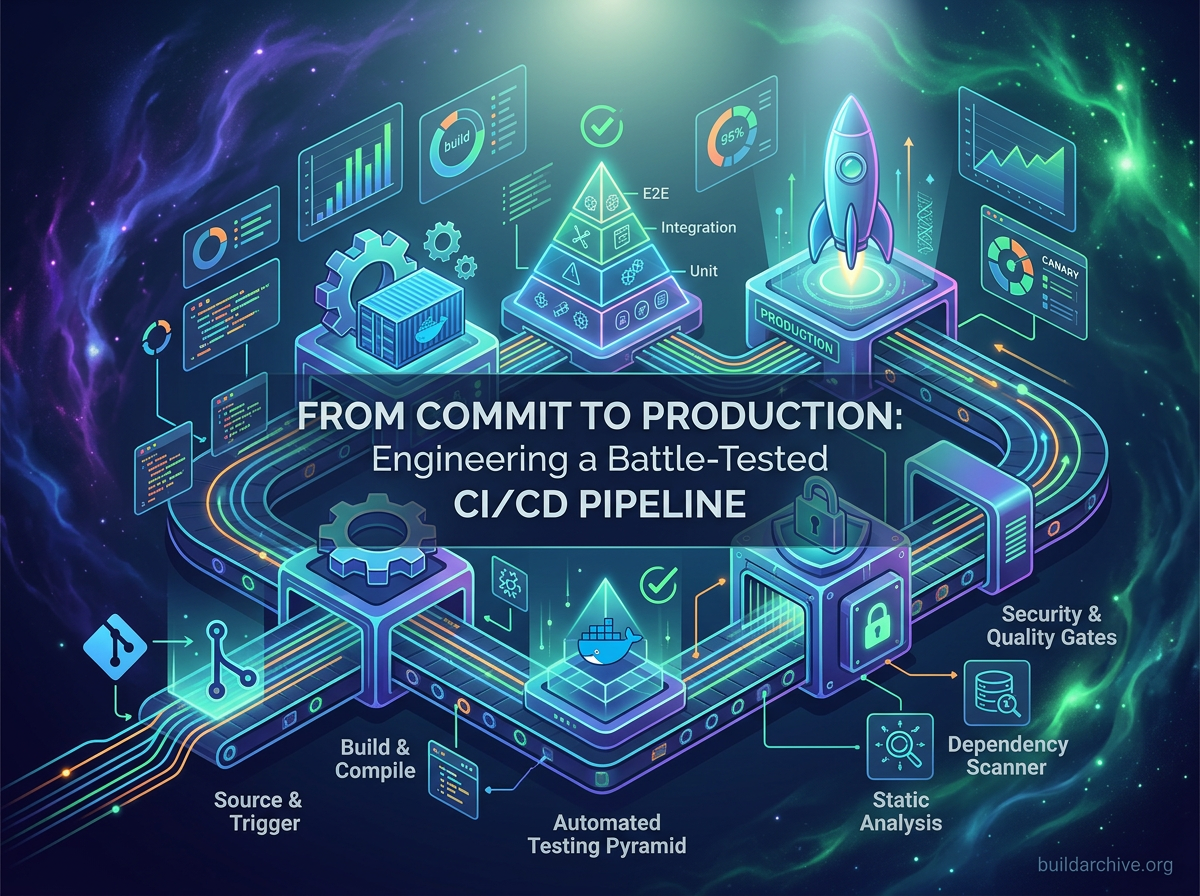
A CI/CD pipeline isn’t a single script — it’s a chain of quality gates, each with a specific responsibility. A failure at any stage stops the pipeline and gives the developer immediate, actionable feedback. Here’s how those stages break down.
Source and Trigger
Everything starts with a git push. Modern pipelines are event-driven, meaning a push to a branch or a merged Pull Request automatically fires a webhook that kicks off the entire process. This stage also handles branch strategy: for example, feature/* branches might only trigger the CI portion, while main triggers the full deployment chain through to staging.
Build
The build stage compiles source code into a deployable artifact — a Docker image in containerized environments, a .jar in a JVM stack, a deployment package in serverless. Two rules apply here: builds must be deterministic (the same code, built twice, produces identical artifacts), and every artifact gets tagged with a unique identifier like a Git SHA before moving forward. This immutable artifact is what gets promoted through every downstream environment.
Automated Testing
This is the heart of the pipeline, and where most teams either shortcut or misconfigure. A healthy test strategy follows the Testing Pyramid: a large base of fast, isolated unit tests; a middle layer of integration tests that verify components work together; and a small top layer of end-to-end tests that simulate real user flows through the full application.
The ordering matters as much as the tests themselves. Unit tests run first. If they fail, integration tests never start. This keeps feedback loops tight and avoids wasting time running expensive tests when the basics are already broken.
Security and Quality Gates
A mature pipeline treats security as a built-in step, not a quarterly review. This is where SAST tools scan source code for vulnerability patterns, SCA tools audit third-party dependencies for known CVEs, and container scanners like Trivy check the built image for OS-level issues. Code coverage thresholds also live here — a hard limit that blocks untested code from advancing further.
Shifting security left into the pipeline means catching vulnerabilities at commit time, not during a production incident six months later.
Deployment and Promotion
The validated artifact moves through a promotion chain, not a single “deploy” step. Each environment — dev, staging, production — acts as its own gate. The artifact doesn’t move forward unless automated validations in the current environment pass. Production deployments use controlled rollout strategies like Blue/Green or Canary releases, which dramatically reduce the blast radius of a bad deploy.
What This Looks Like in Practice
Here’s a simplified but realistic GitHub Actions pipeline for a Node.js service — the kind I use for Express apps that get containerized and deployed via Docker. Notice how the structure reflects the stages above: parallel execution where possible, strict dependencies where it matters.
name: CI/CD Pipeline

on:
  push:
    branches: [main, "feature/**"]

jobs:
  build:
    name: Build & Push Image
    runs-on: ubuntu-latest
    steps:
      - uses: actions/checkout@v4
      - name: Build Docker Image
        uses: docker/build-push-action@v5
        with:
          context: .
          push: true
          tags: registry.example.com/myapp:${{ github.sha }}

  unit-tests:
    name: Unit Tests
    runs-on: ubuntu-latest
    needs: build
    steps:
      - uses: actions/checkout@v4
      - name: Run unit tests inside the built image
        run: |
          docker run --rm registry.example.com/myapp:${{ github.sha }}
            npm run test:unit

  security-scan:
    name: Security Scan
    runs-on: ubuntu-latest
    needs: build
    steps:
      - name: Scan with Trivy
        uses: aquasecurity/trivy-action@master
        with:
          image-ref: registry.example.com/myapp:${{ github.sha }}
          severity: CRITICAL,HIGH
          exit-code: "1"

  deploy-staging:
    name: Deploy to Staging
    runs-on: ubuntu-latest
    needs: [unit-tests, security-scan]
    environment: staging
    steps:
      - name: Deploy via Helm
        run: |
          helm upgrade --install myapp ./charts/myapp
            --set image.tag=${{ github.sha }}
            --namespace staging
A few things worth noting: unit-tests and security-scan run in parallel after the build, cutting total pipeline time. The deploy-staging job won’t run until both pass. The environment: staging directive enables manual approval gates for production. And critically, every job references the same ${{ github.sha }} tag — so the image that gets scanned is the exact same image that gets deployed. That’s the detail that makes promotion meaningful rather than ceremonial.
In my own Express and Socket.IO services, I also add a step here that runs npm audit --audit-level=high before the Docker build. It’s a one-liner, but it’s caught vulnerable transitive dependencies that Trivy missed because they weren’t yet in the CVE databases.
Anti-Patterns That Quietly Destroy Pipeline Trust
Even well-intentioned pipelines tend to drift into bad habits over time. The most damaging one is flaky tests — tests that randomly fail for no clear reason, which teams eventually start dismissing as “just a known issue.” The moment your developers learn to re-run the pipeline until it goes green, the pipeline has lost its entire purpose.
A close second is rebuilding the artifact at each stage instead of promoting the same one. If staging tests a different build than what gets deployed to production, you have no real safety guarantee — you’re just running a simulation.
And finally, there’s the snowflake pipeline: so custom and undocumented that only one person on the team fully understands it. Pipelines break. When they do, recovering quickly matters just as much as recovering quickly from a production incident. Treat your pipeline configuration the same way you’d treat application code — reviewed, versioned, and documented.
Treat the Pipeline as a Product
The most important shift in thinking here is this: your CI/CD pipeline is a product that your entire development team depends on every single day. It deserves ownership, documentation, and continuous improvement — the same way your application does.
Start simple: automate the build, add unit tests, block merges when they fail. Then layer in security scanning, integration tests, and controlled deployments over time. The goal isn’t to build the perfect pipeline on day one — it’s to make each iteration a little more trustworthy than the last.
Once your team experiences shipping software through a pipeline they actually trust, the old way of doing things — manual deploys, environment drift, hoping it works in production — starts to feel like a different era entirely. Take a look at your current workflow and identify every manual step that a machine could own instead. Each one is your next improvement target.